How to Check Gomo Balance (App, SMS & USSD Guide)
If you are a Gomo SIM or Gomo Pocket WiFi user and wondering how to check Gomo balance, then you are in the right place. Simply dial USSD code *143# or text DATA BAL to 8080 and check GOMO Balance Inquiry for free. Before tracking your call and text balance, ensure you have completed Gomo Sim Registration.
How to check balance in Gomo – Step by Step Guide
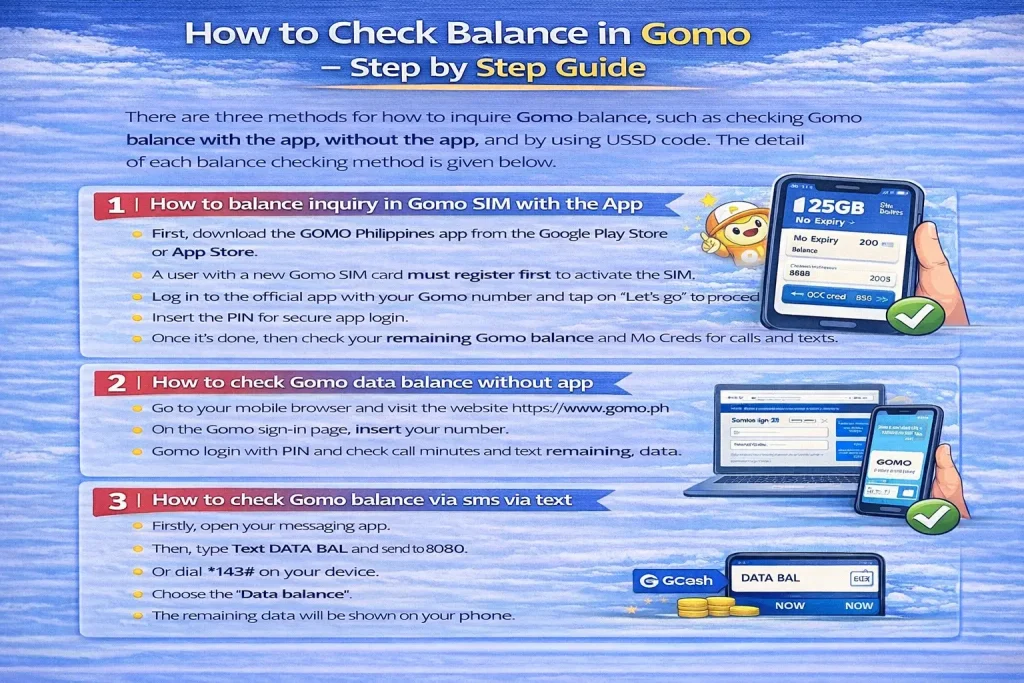
There are three methods for how to inquire Gomo balance, such as checking Gomo balance with the app, without the app, and by using USSD code. The detail of each balance checking method is given below.
1. How to balance inquiry in Gomo Sim with the App
It is a straightforward process to check the balance in Gomo SIM. Follow the steps mentioned below.
- First, download the GOMO Philippines app from the Google Play Store or App Store.
- A user with a new Gomo SIM card must register first to activate the SIM.
- Log in to the official app with your Gomo number and tap on “Let’s go” to proceed further.
- Insert the PIN for secure app login.
- Once it’s done, then check your remaining Gomo balance and Mo Creds for calls and texts.
2. How to check Gomo data balance without app
If you don’t have app access, then check the account details without the app. To do this, follow the instructions below.
- Go to your mobile browser and visit the website https://www.gomo.ph.
- On the Gomo sign-in page, insert your number.
- Gomo login with PIN and check call minutes and text remaining data.
3. How to check Gomo balance via sms via text
This is an alternative way to check the Gomo balance via text or call. Here are easy steps to follow.
- Firstly, open your messaging app.
- Then, type Text DATA BAL and send to 8080.
- Or dial *143# on your device.
- Choose the “Data balance”.
- The remaining data will be shown on your phone.
How do I check my balance on Gomo SIM?
You can check your Gomo balance conveniently by using the Gomo Ph app or by visiting its official website. Furthermore, you can get all the details about how to load Gomo SIM. If you are new to Gomo, first check how to activate Gomo SIM by using the Gomo or GCash app.
How to check Gomo data balance via text?
Are you searching for how to check balance in Gomo SIM via text? We have got you covered here. Open your messaging app and type DATA BAL, then send it to 8080. You will receive the complete information about your Gomo SIM data.
What is Gomo SIM Unlimited Data?
As we know, Gomo is a brand that works under Globe Telecom in the Philippines and uses the 0976 what network. It offers you no expiry data bundles and Gomo unli data. There is no data usage restriction while using the internet. Get the Gomo app download and enjoy the high-speed 5G network in the Gomo PH coverage area. You can earn extra data rewards by sharing your GOMO referral with your friends and family members.
FAQs
Conclusion
We have provided three ways above to track data usage, calls, and texts. You can choose according to your preference. Stay on top of the mobile data balance by knowing how to check Gomo balance via app or USSD code. Before checking data balance, make sure your device is configured with the proper GOMO SIM APN settings. If you need assistance related to data issues, then reach out to the Gomo hotline via the app