
How to Pasa Load TM?
Just imagine that you are chatting with your friend and suddenly your cellphone stops receiving messages or your friend runs out of extra load. In that situation, you can easily help your friend by sharing your load with your friend after TM SIM registration. In short, here you will find a complete guide to how to pasa load tm sharing.
How to pasa load tm to smart? This is the question in the user’s mind and Globe Telecom offers a new scheme of sharing your load with your family and friends in any situation. You can use the share-a-load offer and send a load with your loved ones who are running out of extra load. People can share loads from ₱1 to ₱500 having different expiry dates.
How to PasaLoad in TM?
There is more than one way to how to pasaload tm to dito, one is via *143# code and the second is my GlobeOne app.
Using code *143#:
- Open the dialer on your mobile phone and dial *143#.
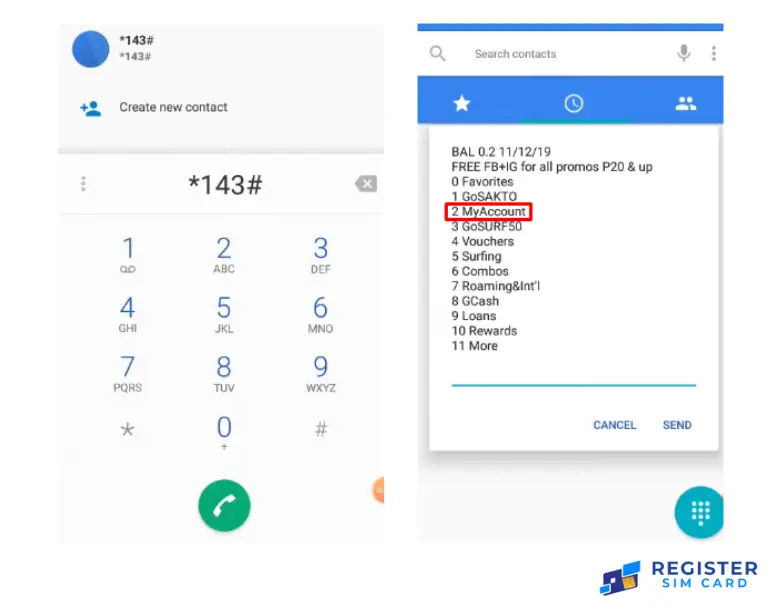
- Select a “Pasa Load” option.
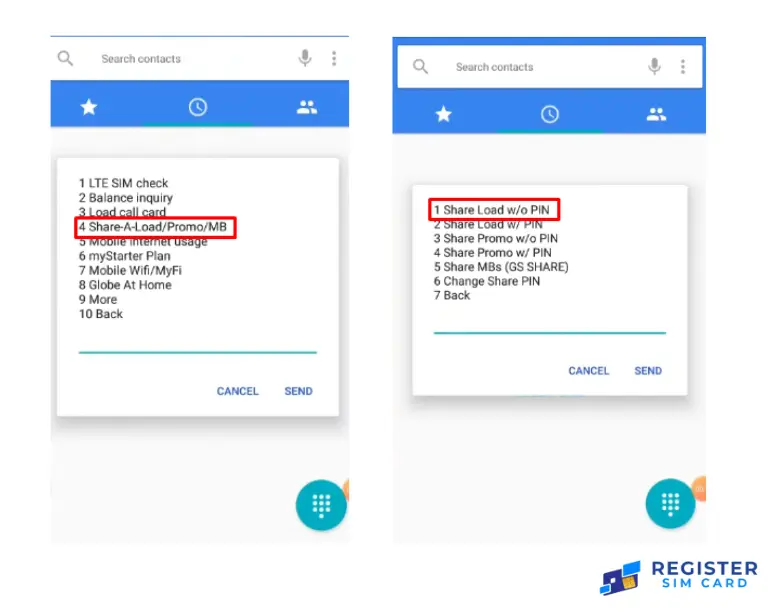
- Type the recipient’s mobile number
- Select the load amount
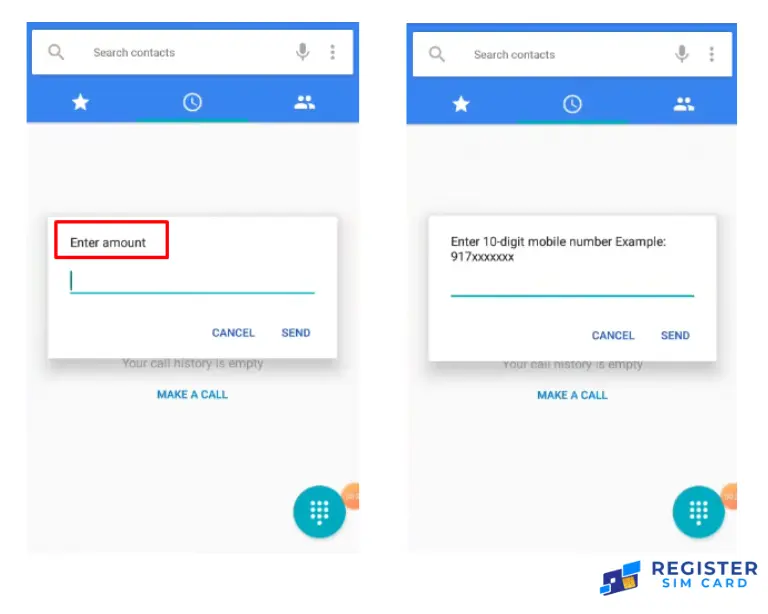
- Click on the confirmed amount.
How to Pasa load TM to TM via Text:
Open the inbox and type “PASALOAD > recipient’s mobile number > load amount” and send it to 808.
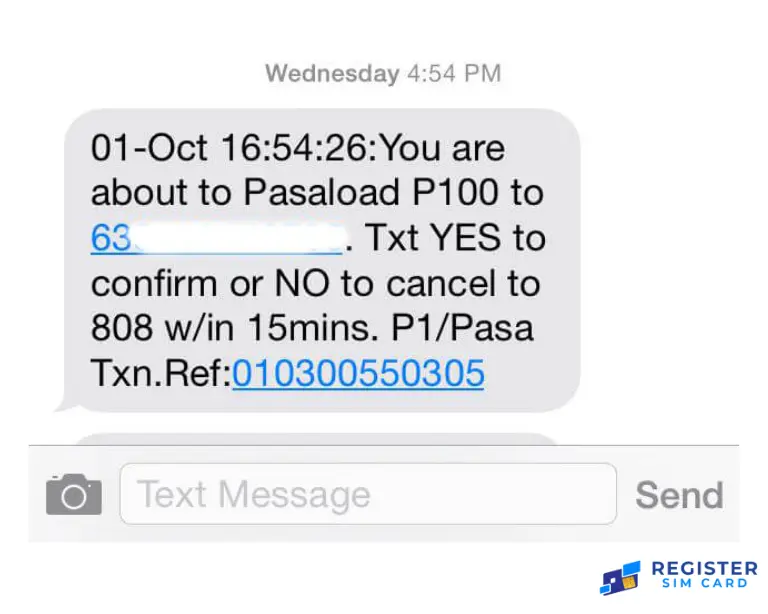
Using the TM Mobile application:
- Open Play Store on your mobile and search for “TM Mobile App”. Download the app and then install it. After installation, create your account.
- Open the menu and select “Pasa Load”.
- Type the recipient’s cell phone number.
- Select the load amount you want to share.
- Now you can confirm the transaction.
How to check Pasa Load Transactions?
By following the below-mentioned steps, you can easily check Pasa load transactions:
- First, dial *143# on your mobile and press the “Pasa Load” button and then “Transaction History”.
- Globe will send you a message. Check your inbox for the transaction confirmation message.
How to transfer the load from TM to TM?
Users can use the *143# code to transfer the load from TM to TM. You have to follow these below-mentioned steps:
- Open your cell phone’s dialer and dial the *143# code.
- A menu will open and select the “My Account” menu.
- Select the “Share Load” option.
- Choose the PIN code
- Select the load amount and then enter the recipient’s sim number.
How to make pasaload from Tm to Globe?
Subscribers who are looking for how to send pasaload in TM can share pasaload using other ways such as using codes, promos, and data from TM to Globe. They also can use the GlobeOne and GCash applications on mobile. You can use Autoload Max electronic reloading service through your retailers.
After creating your account, you can easily share your load through text. If you are looking for how to pasaload tm to another network via text, then follow these steps:
- Users can share the load by changing the first digit of the recipient’s number from 0 to 2.
- Write a text message with the given amount of load you want to share and send this message to the modified recipient number.
- You can also write a PIN code.
- Type “YES” after confirming the transaction within 5 minutes.
How do I transfer the load to another number?
Here people can find out how to send pasaload in TM. Follow the mentioned steps to transfer the load to another number:
- Dial *143# on your mobile phone.
- Choose “My Account”
- Select the promo code
- Now choose the share load PIN
- Select the load amount you want to share and then type the recipient’s mobile number.



![Dito 5G Coverage [2026]: Full List of Areas & Official Map](https://registersimcard.ph/wp-content/uploads/2025/07/Dito-5G-Coverage-768x448.webp)