DITO APN Settings 2026: Step-by-Step Guide for High Speed Internet
If you want to learn how to configure DITO APN Settings to unlock high-speed internet on your device, then you are at the right place. You will find the step-by-step guide with troubleshooting tips and additional DITO APN settings Philippines.
APN is the abbreviation for Access Point Name. It is the settings on your mobile device that are used to connect to the internet using your mobile’s network. This APN address is different for all carriers, meaning each carrier has unique APN settings. In DITO SIM, the APN has to be correctly configured so that it can use the internet easily to send/receive multimedia messages.
DITO is a communication company in the Philippines that offers 4G LTE, LTE-A, and 5G services. It is an agreement between Udenna Corporation and China Telecommunications Corporation. In this article, we have written all the details about DITO SIM APN settings to unlock high-speed internet.
Steps for DITO APN Settings:
The steps for DITO SIM APN settings in the Philippines are as follows:
1. Go to the device’s settings
2. Navigate to the “Mobile Network” options
3. Search for DITO Access point Names and APN options
4. Click on the “New APN” to start the configuration process
5. APN parameters:
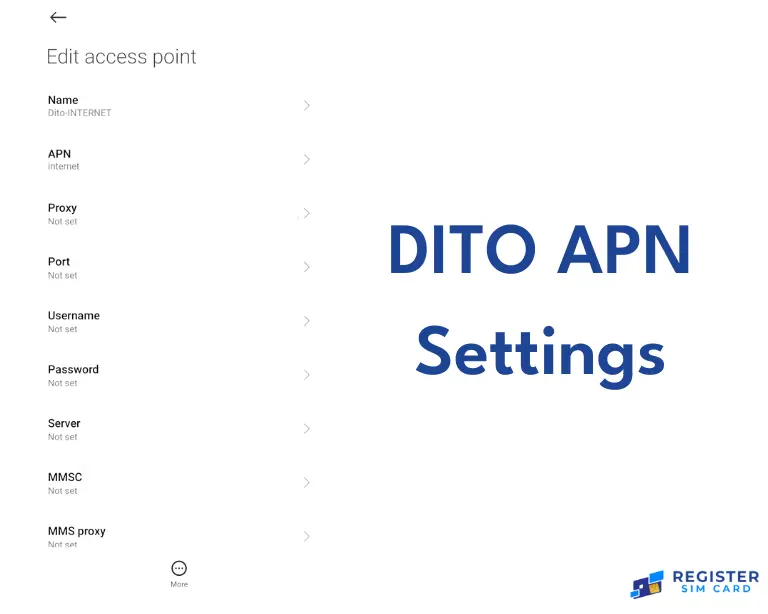
- Name: DITO Internet
- APN: internet.dito.ph
- Proxy: Not set
- MCC (Mobile country code): 515
- MNC (Mobile network code): 66
- APN Type: default, xcap, supl
- APN Protocol: IPV4/IPV6
- APN Roaming Protocol: IPV4/IPV6
6. Save the configured APN settings.
7. Restart your device and select the available DITO APN from the list.
8. Test Connection: Test your internet connection and check whether you can easily send/receive text messages or not.
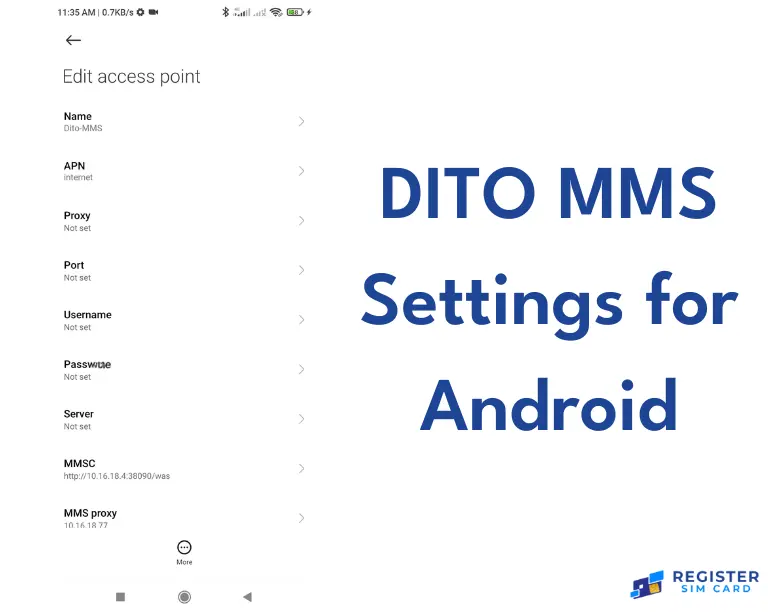
DITO MMS Settings for Android
Follow these simple steps to create new MMS APN settings for Android.
MMS APN Parameters:
- APN Name: DITO MMS
- MNC(Mobile network code): 66
- APN Type: default, xcap, sulp
- APN Protocol: IPV4/IPV6
- APN Roaming Protocol: IPV4/IPV6
- Press the “Save” button on the upper right corner to save your configured settings.
Here are more details about the DITO SIM APN settings for iPhones.
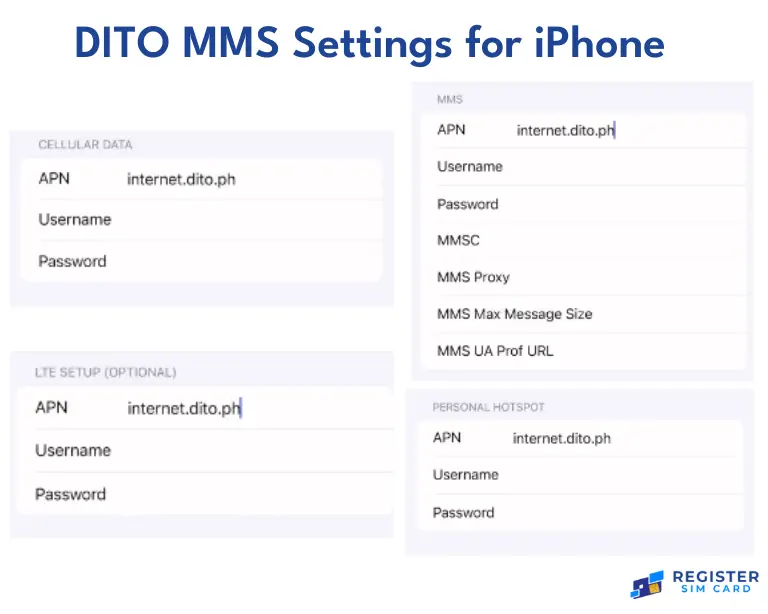
DITO MMS Settings for iPhone:
Create a new MMS APN by following these steps:
- Go to the “Cellular Network Settings”
- Modify the MMS data:
- Username: Blank
- Password: Blank
- MMSC: Not set
- MMS port: Not set
Also, configure the other specific values for MMS Message size and MMS UA Prof URL. Restart your phone to activate the updated DITO APN Settings.
Troubleshooting tips:
Follow these tips if you face internet connectivity issues.
- Select and activate the DITO internet APN.
- Insert the DITO SIM card in slot 1 for dual SIM phones.
- Disconnect Airplane mode to reconnect mobile data.
- Reboot your mobile.
Additional DITO SIM APN Settings:
For additional APN settings configure the DITO IMS APN for 4G phones lacking it by default.
FAQs
Conclusion
By setting up these detailed steps and tips, people can optimize their mobile phones for DITO’s high-speed internet in 2026 Regularly updating and checking the DITO internet APN settings ensures a flawless online experience.