TM APN Settings: Quick & Easy Guide for Fast Internet on TM 5G
APN acts as a connection between your mobile phone and the internet. In other words, APN is a private code that tells you how to connect your phone to the network. With the right APN settings, you can access the internet at any cost. Here is the complete guide for those who are searching for TM APN settings.
TM is a telecommunication company in Philippines that provides a huge range of Internet services. The correct APN for TM SIM is necessary to enjoy flawless internet and other services. Here we will discuss the APN for TM 5G.
Configuration For TM APN settings
National (Default) settings:
- Name: TM Internet
- APN: internet
- Username: TM
- Password: TM
- Authentication Type: PAP
- MCC: 515
- MNC: 1
- APN Type: default, supl
Visayas setting:
- Name: TM Visayas Internet
- APN: Visayas
- Username: TM
- Password: TM
- Authentication Type: PAP
- MCC: 515
- MNC: 1
- APN Type: default, supl
Mindanao settings:
- Name: TM Mindanao Internet
- APN: Mindanao
- Username: TM
- Password: TM
- Authentication Type: PAP
- MCC: 515
- MNC: 1
- APN Type: default, supl
Globe APN Settings. Table
Globe APN Settings
Use these values to configure mobile data
| Field | Value |
|---|---|
| APN Name | myGlobe Internet |
| APN | internet.globe.com.ph |
| Proxy | Not Set |
| Port | Not Set |
| Username | Not Set |
| Password | Not Set |
| Server | Not Set |
| MMSC | Not Set |
| MMS Proxy | Not Set |
| MMS Port | Not Set |
| MCC | 515 |
| MNC | 03 |
| Authentication Type | Not Set |
| APN Type | default and supl |
| APN Protocol | IPv4 |
| APN Roaming Protocol | IPv4 |
| Bearer | Not Specified |
| MVNO Type | None |
| MVNO Value | Not Set |
myGlobe INET
Use these values to configure mobile data
| Field | Value |
|---|---|
| APN NAME | myGlobe INET |
| APN | http.globe.com.ph |
| Proxy | Not Set |
| Port | Not Set |
| Username | Not Set |
| Password | Not Set |
| Server | Not Set |
| MMSC | Not Set |
| MMS Proxy | Not Set |
| MMS Port | Not Set |
| MCC | 515 |
| MNC | 03 |
| Authentication Type | Not Set |
| APN Type | default,supl |
| APN Protocol | IPv4 |
| APN Roaming Protocol | IPv4 |
| Bearer | Not Specified |
| MVNO Type | None |
| MVNO value | Not Set |
myGlobe MMS
Use these values to configure mobile data
| Field | Value |
|---|---|
| APN NAME | myGlobe MMS |
| APN | mms.globe.com.ph |
| Proxy | Not Set |
| Port | Not Set |
| Username | Not Set |
| Password | Not Set |
| Server | Not Set |
| MMSC | http://192.40.100.22:10021/mmsc |
| MMS Proxy | 203.177.42.214 |
| MMS Port | 8080 |
| MCC | 515 |
| MNC | 03 |
| Authentication Type | Not Set |
| APN Type | mms |
| APN Protocol | IPv4 |
| APN Roaming Protocol | IPv4 |
| Bearer | Not Specified |
| MVNO Type | None |
| MVNO value | Not Set |
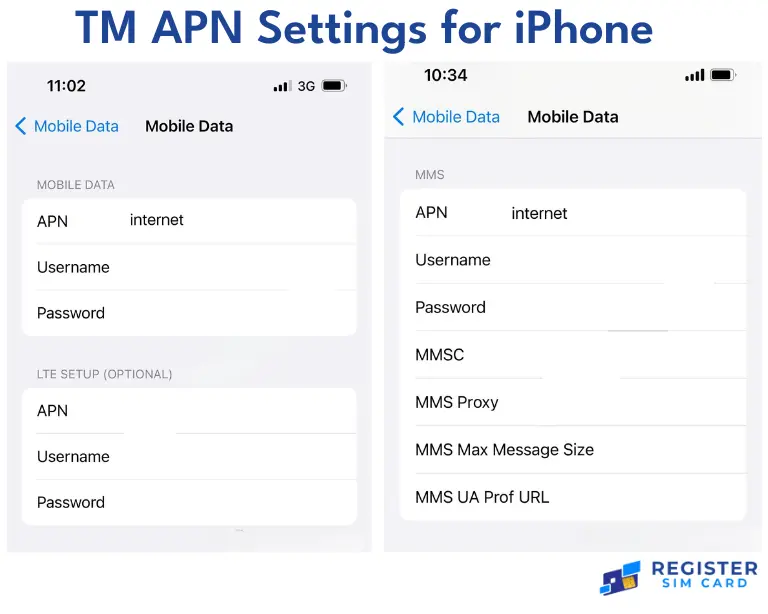
TM APN settings for iPhone
Apple users can upgrade to the latest version of IOS for the automatic APN settings. They can also change the APN for TM fast internet settings manually.
Steps:
- Firstly, go to the settings and open “Mobile Network”. Now choose the “Mobile data network”.
- Set the new APN to “truphone.com” by leaving the username and password blank.
- Press the “Home” button. After that, all settings will be saved after restarting the phone.
TM APN settings for Android
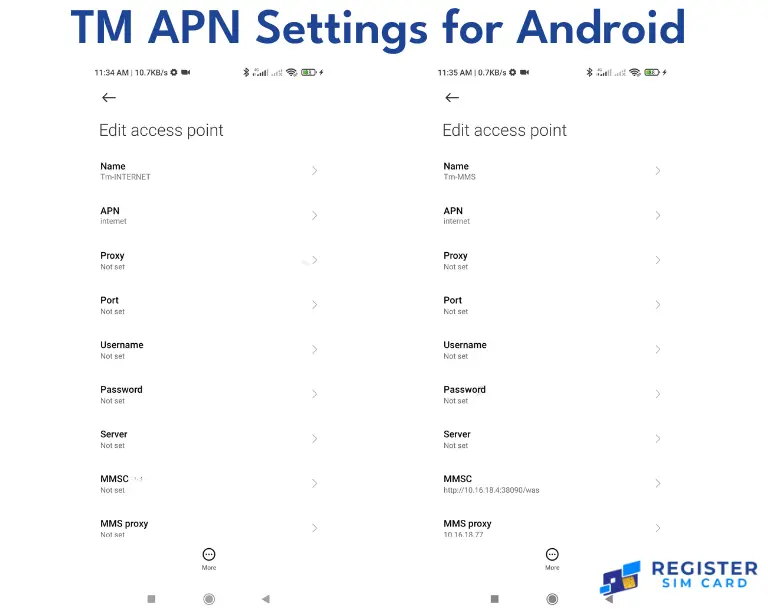
People can manually configure TM APN settings. Here are some easy steps for setting up TM APN on Android. Similarly, DITO APN settings can also be configured manually
- Firstly, go to the settings.
- Select “Connections”
- Choose “Mobile network” and after that, open APN settings.
- Click on the “+” button and add the new APN settings.
- Now enter the setting list as mentioned above.
- Save all the new settings
- Finally, restart your mobile phone to apply the new changes.
Some optimization tips
- Always try to move to a place with good coverage because poor signals can affect your internet data.
- Update your phone regularly to use the latest versions of software.
- Clear the cache regularly so that it can help the internet to run smoothly.
- Use data-saving features on your mobiles to improve your internet speed and after that, use the correct access point name for TM.
- In addition, always monitor your data usage so that you can avoid any slowdowns in your internet connection.
FAQs
Summary
Correct APN settings are very essential for a better internet experience. Therefore, they also increase the downloading speed and can reduce the ping making the gaming experience better for game lovers. In addition, by following our guide, you can set your TM APN settings without any trouble.
As you know, technology is always developing. We also have shared some configuration tips. Contact us for the latest updates and help.